
What does the government’s Be Ready campaign mean for solar panels? If you’ve got panels or a battery, there’s one big question: if the power goes off, will your system keep your home running?
The short answer: most solar panel and battery systems switch off in a power cut. That's a safety rule, not a fault. To keep your home running, your system needs a backup gateway (or an emergency power supply) that disconnects you from the grid and powers your home from your battery and panels.
The good news is that the government's own guidance recognises this. Its power cuts page says some solar and battery installations can keep supplying power in a cut, as long as they're designed and set up to run independently of the grid.
At P4 Solar, we design and install solar and battery systems for homes and businesses across Yorkshire and the North, including systems built to keep running in a power cut. In this guide, we explain what the Be Ready campaign actually says, what it means for solar panel owners, and how to make sure your system is genuinely ready when the lights go out.
Quick Navigation
Your Be Ready power cut checklist for solar homes (Free PDF Download)
What Is the Government's Be Ready Campaign?
Be Ready is a three-year Cabinet Office campaign, launched on 22 October 2026, that asks UK households to be able to cope for three days if essential services are disrupted. That covers severe weather, flooding, cyber attacks, water outages and power cuts.
The idea is simple. If most households can look after themselves for a few days, the emergency services can focus on the people who need help most. It replaces the government's older Prepare website, and it's backed by more than 500 organisations.
The official Be Ready checklist includes:
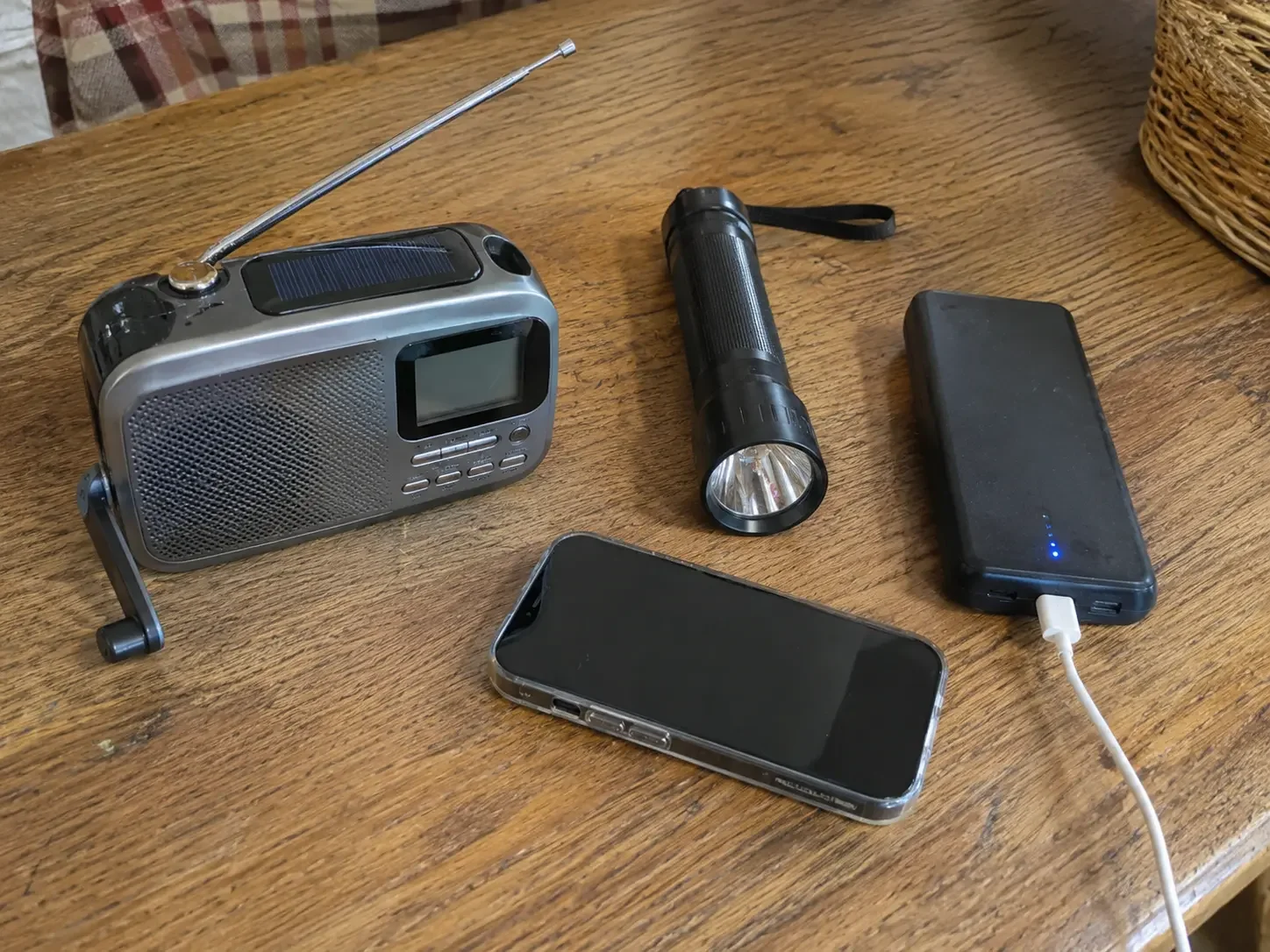
Bottled water (3 litres per person, per day)
Food that doesn't need a fridge or cooking
A torch and spare batteries
A battery or wind-up radio
A charged power bank
Cash, essential medicines, a first aid kit and copies of important documents
You'll notice what's not on the list: anything that keeps your home itself running. The checklist is about three days of supplies, not three days of electricity. Your fridge, router, lights and heating aren't covered at all. That's where solar panels and batteries come into the conversation.
What Does the Be Ready Campaign Say About Power Cuts?
The Be Ready campaign says most UK power cuts are short and local, but warns that longer ones could last several days, with regional or (though unlikely) national impact. Its power cuts page is worth reading in full, but here are the parts that matter most for homeowners:
Rota disconnections are possible. In the unlikely event of a national energy shortage, power could be cut area by area for around three hours at a time. Each area is given a load block letter, which you can find by entering your postcode at powercut105.com (it’s also on some electricity bills).
Your heating will probably stop. The guidance is clear that gas ovens, boilers, heat pumps and home internet won't work without power.
Report cuts on 105. It's free in England, Scotland and Wales (03457 643643 in Northern Ireland).
Sign up to the Priority Services Register if anyone at home has additional needs, such as relying on medical equipment.
Keep fridge and freezer doors shut so they stay cold for several hours.
What the government's power cut advice says about solar panels and batteries
This is the line solar owners should pay attention to. The guidance says that if you have solar panels and a battery storage system with power backup capability, some installations can continue to provide power during a power cut if they are designed and configured to operate independently of the electricity grid.
That last part is the bit most people miss. Having panels and a battery isn't enough on its own. Your system has to be designed for backup from day one, or upgraded to it.
✅ P4 Solar's tip: Not sure whether your system has backup? Check your installation paperwork for the words "backup gateway", "EPS" or "island mode". If none of them appear, it almost certainly doesn't, but we're happy to check for you.
Why Most Solar Systems Switch Off in a Power Cut
Standard grid-connected solar panels and batteries shut down automatically in a power cut to protect engineers working on the network. If your system kept pushing electricity into the grid, it could energise lines that engineers believe are dead.
So the moment your inverter senses the grid has gone, it stops. That happens even on a bright, sunny day, and even with a fully charged battery. It isn't a fault, and it doesn't mean you bought the wrong system. It's simply that backup wasn't part of the design.
The fix is a piece of kit that lets your home safely disconnect from the grid and run on its own. That's a backup gateway.
What Is a Backup Gateway?
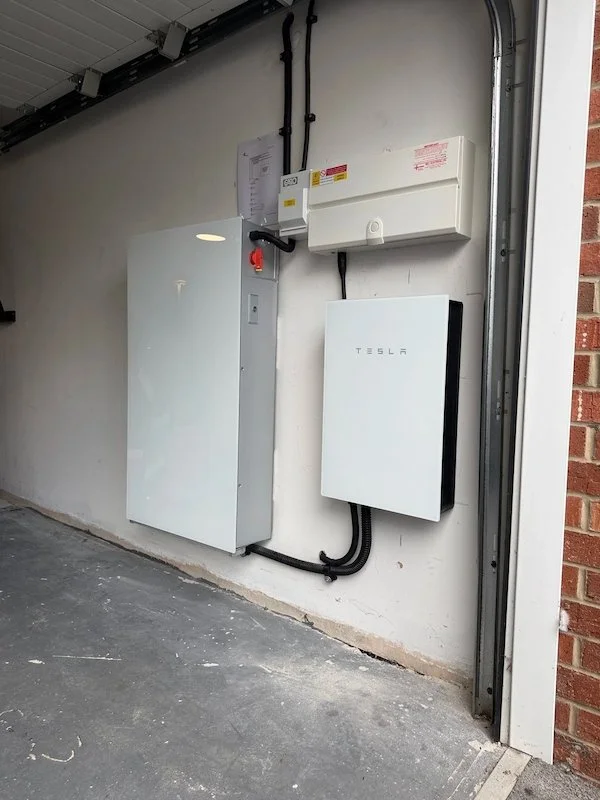
A solar backup gateway is a smart switch that sits between the grid and your home. It detects a power cut, isolates your home from the network, and switches you over to your battery and solar panels, usually so fast you barely notice. When the grid comes back, it reconnects you automatically.
In other words, the gateway is what turns a battery that saves you money into a battery that keeps your lights on.
How a backup gateway works in a power cut
The grid fails. The gateway detects the loss of supply straight away.
Your home is islanded. The gateway safely disconnects your home from the network, so nothing can feed back into the lines (this is called "island mode").
Your battery takes over. Power flows from your battery to the circuits connected to backup.
Your panels keep working. With the right design, your solar panels carry on generating during daylight, powering your home and topping up your battery.
The grid returns. The gateway reconnects you and your system goes back to normal.
Backup gateway vs EPS: what's the difference?
| EPS | Backup gateway | |
|---|---|---|
| What it powers | A dedicated socket or a few chosen circuits | Selected circuits or your whole home |
| Switchover | Can be slower, or need a manual switch | Automatic, often near-instant |
| Best for | Keeping the essentials going (fridge, router, a few lights) | Homes that want everyday life to carry on as normal |
| Installation | Simpler, often built into your inverter | More involved, sits between the grid and your home |
The right option depends on your home, your battery and what you’d want to keep running. Get in touch and we’ll give you a bespoke quote based on your requirements.
Whole-home backup or essential circuits?
This is one of the most important decisions you'll make, and it's worth getting right at the design stage:
Essential-circuit backup keeps the things you can't do without running: lights, fridge-freezer, router, boiler controls, a few sockets. It makes your battery last longer.
Whole-home backup keeps everything connected, so your home runs as normal. You'll still need to go easy on high-power appliances like ovens, kettles and EV chargers, or your battery will drain fast.
Which one suits you depends on your battery size, your inverter's output, your home's supply (single- or three-phase) and what you'd genuinely need in a three-day cut. We'll talk you through it during your survey.
⚡ Want to know if your home can have backup? Book a free consultation with the P4 team.
The Backup Gateways We Install
At P4 Solar, we install backup gateways from Sigenergy, Hanchu, Tesla, Solax and Anker. Your gateway always has to be the same brand as your battery, because the two are designed to talk to each other. You can't mix and match, which is why it's worth thinking about backup before you choose a battery.
The good news? They all do the same core job: detect the cut, isolate your home and switch you to battery and solar power. The real differences are in how much of your home they can back up and which battery they pair with.
| Backup gateway | Works with | Good to know |
|---|---|---|
| Sigenergy Home Pro Gateway | SigenStor | Comes in two versions. The SP-F handles a full 100A single-phase supply for whole-home backup; the standard SP suits partial backup. |
| Hanchu Gateway | Hanchu ESS batteries | Supports both whole-home and tiered backup, with fast UPS-level switching. |
| Tesla Backup Gateway | Tesla Powerwall | Detects outages and switches your home to Powerwall automatically. Backup is managed in the Tesla app. |
| Solax Mate Box | Solax inverters and batteries | Solax's whole-home backup solution, tidying the switching kit into one box. |
| Anker Gateway | Anker SOLIX home batteries | Anker's whole-home backup option pairs with its home battery range. |
✅ P4 Solar’s tip: With Sigenergy in particular, the SP vs SP-F choice matters. If whole-home backup is your goal, make sure your quote specifies the version that can handle your full supply.
Not sure which battery is right for you in the first place? Our guide to the best batteries for solar panels compares the options, and you can read more about the Tesla Powerwall.
How Long Could a Home Battery Keep You Going in a Power Cut?
How long a home battery lasts in a power cut depends on two things: how much energy it stores (kWh) and how much you’re using. Running just the essentials, a typical 10 kWh battery could keep a home going for just over three days before your solar panels add anything. Try to run your home as normal, and that drops to just over a day.
Here’s a rough guide:
| Usable battery capacity | Essentials only (3 kWh/day) | Normal use (7.5 kWh/day) |
|---|---|---|
| 5 kWh | 1.7 days | 16 hours |
| 10 kWh | 3.3 days | 1.3 days |
| 13.5 kWh (e.g. one Powerwall) | 4.5 days | 1.8 days |
These are theoretical estimates, assuming the battery starts fully charged. Essentials = fridge-freezer, router, LED lights, boiler controls and phone charging. Figures exclude solar top-up.

A few things change the picture:
Your solar panels. With backup set up correctly, your panels keep generating in daylight. On a decent day, that can refill a good chunk of your battery and stretch your backup far beyond the figures above.
The time of year. Winter days are short and cloudy, so expect much less solar top-up in December than in June. (Panels do still generate on cloudy days, as we explain in our cloudy days guide.)
Power output, not just capacity. Your battery can only deliver so many kilowatts at once. A 3 kW kettle and a 2 kW oven together can max it out, even with a full battery.
Your heating. A gas boiler only needs a little electricity for its pump and controls. A heat pump needs far more, so it will drain your battery much faster.
Set a backup reserve
Most backup-ready batteries let you hold back a percentage of charge (often 20–30%) just for power cuts. Your battery still saves you money day to day, but it never runs completely flat right before an outage.
✅ P4 Solar's tip: When there's a storm or Met Office warning, bump your reserve up for a few days. Some systems can do this automatically based on weather alerts.
Can You Add a Backup Gateway to an Existing Solar System?
Yes, in many cases you can add a backup gateway to an existing solar and battery system, as long as your battery brand offers a compatible gateway. If yours doesn't, backup may need a different approach, or a new battery.
Here's what we check:
Your battery and inverter brand. The gateway has to match.
Your supply. Single-phase or three-phase, and its size (most homes have a 100A supply).
Your consumer unit and wiring. Backup circuits may need separating, and a gateway usually needs its own earthing arrangement.
Your DNO approval. Changes to how your system connects to the grid may need an updated application to your network operator. We handle this for you.
How long does it take? A full solar and battery system is usually installed in a day, but every job is different. We’ll confirm timings for your home after your survey.
Plenty of batteries were installed with bill savings in mind rather than backup, and that’s completely normal. In many cases backup can be added later.
⚡ Already have solar and a battery? Get a free backup compatibility check and we'll tell you exactly what's possible.
Is Now a Good Time to Invest in Solar and Battery Storage?
Yes. With energy prices rising again, government-backed finance on the way and 0% VAT on solar panels and batteries, now is a strong time to invest in solar panels and battery storage. The Be Ready campaign adds one more reason: with backup, your system keeps your home running when the grid doesn't.
Why now is a great time to go solar
| Reason | What it means for you |
|---|---|
| Energy prices are rising again | The price cap rose 4% in October 2026 to £1,723 a year for a typical household, and forecasters expect another rise in January 2027. Every unit you generate and store is one you don't have to buy. |
| Government-backed finance | The new Warm Homes Loan Scheme lets lenders offer cheaper loans of up to £15,000 each for solar panels and batteries, with some households potentially borrowing at 0%. |
| 0% VAT on solar panels and batteries | Most domestic solar and battery installations currently qualify for 0% VAT until March 2027. |
| You can earn from your surplus | Through the Smart Export Guarantee, you're paid for the solar energy you don't use. |
| Power cuts are on the agenda | The Be Ready campaign asks every household to plan for three days of disruption. A system with a backup gateway can keep your essentials, or your whole home, running. |
| Backup is easiest to add now | Installing backup at the same time as your solar installation is more cost-effective than retrofitting it at a later stage. |
Case study: whole-home backup at a North Yorkshire farmhouse
Rural homes are often the first to lose power in a storm, and the last to get it back. For one large stone-built farmhouse near Ripon, we designed a battery system that keeps the whole home running in a power cut.
| Property | Multi-acre, stone-built farmhouse in rural North Yorkshire |
|---|---|
| Battery storage | 7 x Hanchu ESS 9.4 kWh batteries (65.8 kWh in total) |
| Inverters | 2 x LUX Power 12 kW hybrid inverters |
| Backup | 2 x emergency power supply (EPS) circuits for full home backup in a power cut |
| Solar | Not yet. The system is ready for solar panels to be added later |
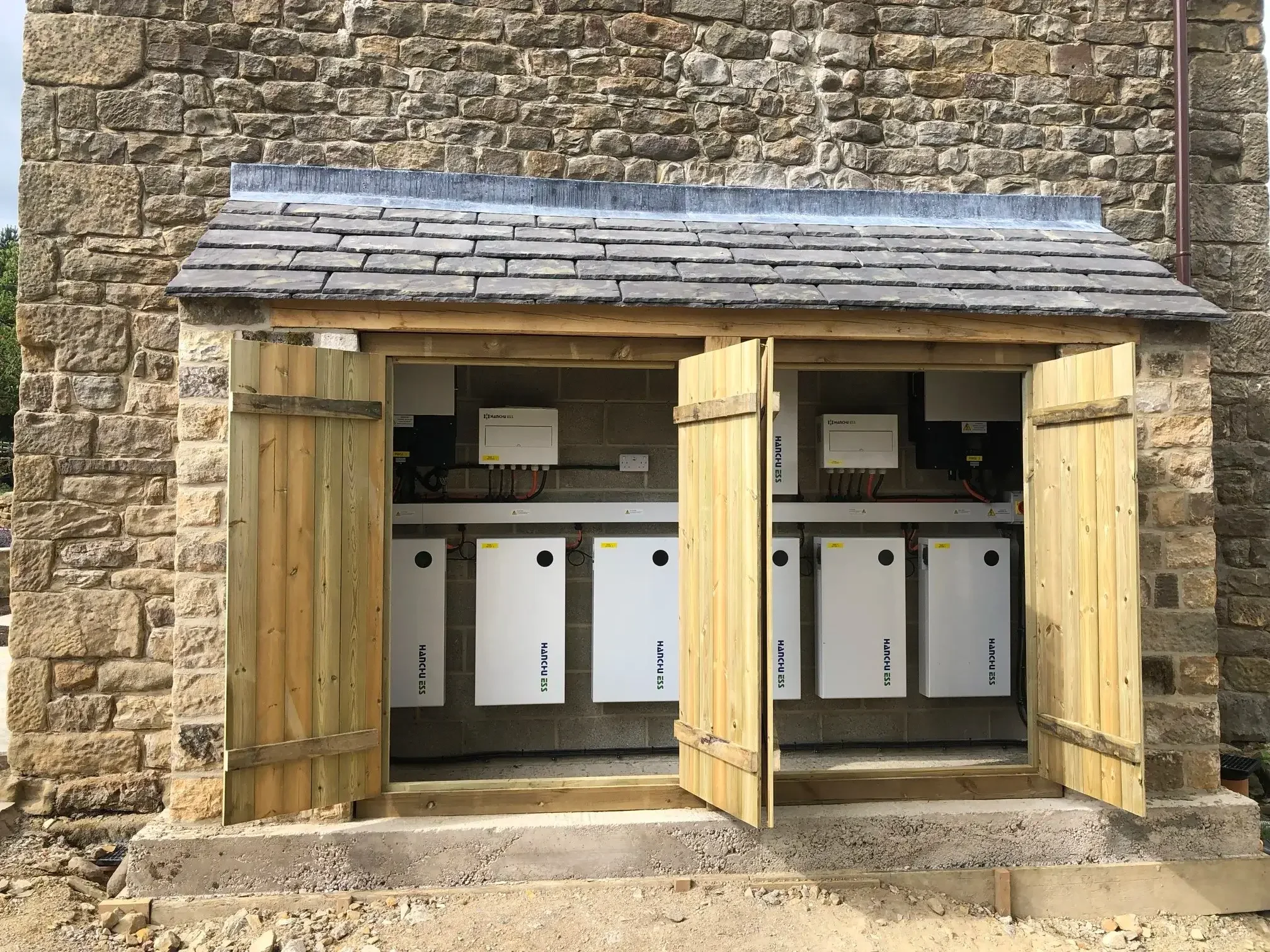
The batteries are housed in a purpose-built lean-to, so they’re protected and tidy. Day to day, the system stores cheaper off-peak electricity to cut the farm’s bills. When the power goes, the backup circuits take over.
“We forget we’ve even got it except for when the significantly reduced power bills come in!”
Richard Gray, homeowner
Backup isn't essential for every home, but it's worth considering for most
If you’re getting solar and a battery anyway, we’d always recommend including backup in your quote. It turns your battery into a genuine safety net. The right setup depends on your current system and which gateway your battery needs, so we’ll tailor it to your home.
It's especially worth it in these situations:
| Your situation | Why backup matters | What we'd suggest |
|---|---|---|
| Medical equipment at home | Losing power can be more than an inconvenience | Put that equipment on backup and register for the Priority Services Register |
| Rural home | Overhead lines are more exposed to storms, and outages can take longer to fix | Backup, plus a higher battery reserve through winter |
| Heat pump or electric heating | Your heating stops completely in a power cut | A battery and inverter sized to run your heating, or at least its controls |
| Working from home | No power means no router, laptop or calls | Essential-circuit backup that covers your office sockets |
| Young children or older relatives at home | A cold, dark home is harder on those most vulnerable | Whole-home backup if your system allows it |
| You already have solar and a battery | It may not have been set up for backup | A free backup compatibility check |
Backup is the bonus, savings are the backbone
The real value of solar and battery storage is what it does every other day of the year: cutting your bills, storing free solar or cheap off-peak energy, and protecting you from price rises. Backup power is the safety net on top. For the full breakdown on payback, read are solar batteries worth it?
⚡ Thinking about solar, a battery or backup? Book your free consultation with the P4 team.
Your ‘Be Ready’ Power Cut Checklist for Solar Homes
The government's Be Ready checklist covers your supplies. This one covers your solar system, so you know exactly what will (and won't) work when the power goes.
Before a power cut:
☐ Find out whether your system has a backup gateway or EPS (check your paperwork or ask your installer)
☐ Know which circuits are on backup: whole home, or just the essentials?
☐ Set a backup reserve in your battery app (20–30% is a good start)
☐ Raise your reserve when a Met Office warning is issued
☐ Find your load block letter at powercut105.com (it’s also on some electricity bills)
☐ Register for the Priority Services Register if anyone at home has additional needs
☐ Save 105 in your phone
☐ Put together the official Be Ready kit: water, food, torch, radio, power bank, cash
During a power cut:
☐ Report it on 105 or your network operator's website
☐ Check your battery app to see your charge level
☐ Avoid running several high-power appliances at once
☐ Keep fridge and freezer doors closed
If you don't have backup:
☐ Don't panic. Your panels and battery will switch back on automatically when the grid returns
☐ Use the official Be Ready kit to bridge the gap
☐ Talk to P4 Solar about adding a gateway before the next storm
📄 Free Download: Your Be Ready Power Cut Checklist for Solar Homes
Want this checklist to hand when the lights go out? Download our free, printable version and pop it on the fridge, in a kitchen drawer or next to your consumer unit. You’ll find it fast when you need it (and you can’t rely on your phone or the internet in a power cut).
FAQs: The ‘Be Ready’ Campaign and Solar Panels
-
The Be Ready campaign asks households to prepare for three days of disruption, including power cuts. For solar panel owners, it's a good prompt to check whether your system has backup. Without a backup gateway or EPS, most solar and battery systems switch off in a power cut.
-
No. The Be Ready campaign is a sensible reminder that a little preparation makes disruption much easier to handle. It’s a long-term campaign to help households prepare for the kind of disruption that already happens, like winter storms. Most UK power cuts are short and local, and wider rota cuts are considered unlikely. That said, winter storms do bring outages every year, so it’s a sensible time to check whether your solar and battery system would keep your home running.
-
No. The official Be Ready checklist covers supplies such as water, food, a torch, a radio and a power bank. It doesn't include home batteries, solar panels or generators, although the campaign's power cuts page does mention that some solar and battery systems can keep running if designed for it.
-
Possibly, if your system has backup and you stick to the essentials. A fully charged 10 kWh battery running just your fridge-freezer, lights, router and boiler controls could last just over three days before your panels top it up. Running your home as normal, it’s more like a day. In winter your panels will add less, so a bigger battery or a higher backup reserve helps. Bear in mind that Be Ready asks for three days of supplies, not three days of electricity. Backup is there to make those days more comfortable, not to replace the checklist.
-
It depends on your current setup and needs. For example:
Adding a backup gateway to an existing compatible battery
Building backup into a new solar and battery installation
Replacing a battery that isn’t backup-compatible
Each of these involves different work, so every P4 quote is bespoke and fixed after a free survey. You’ll know exactly what you’re paying before any work starts. Get in touch for an exact costing based on your home.
Final Thoughts: Is Your Home Ready?
The Be Ready campaign isn't a warning that a blackout is coming. It's a sensible reminder that being prepared makes disruption easier to handle. For solar panel owners, the most useful thing you can do is find out whether your system will actually keep running when the grid goes down.
If it won't, a backup gateway is usually the answer. And if you're planning solar or a battery now, building backup in from the start is the simplest, most cost-effective way to do it.
Be Ready with P4 Solar
Whether you're starting from scratch or upgrading an existing system, our team will design backup that fits your home, your battery and your budget, with a fixed quote and no surprises.
⚡ Book your free consultation today · Explore our solar battery storage · See our case studies
Learn More About Solar
Are Solar Batteries Worth It?: the full picture on savings, payback and backup.
Best Batteries for Solar Panels: UK Homeowner’s Guide: how the leading home batteries compare.
How Do Solar Batteries Work to Cut Your Energy Bills?: how a battery stores and uses your energy day to day.
How Much Can You Save with Solar Panels?: what solar could mean for your energy bills.
UK Solar Panel Grants in 2026 Explained: the government support available right now.